Guide
How to analyze your portfolio with ChatGPT or Claude
Published · Updated
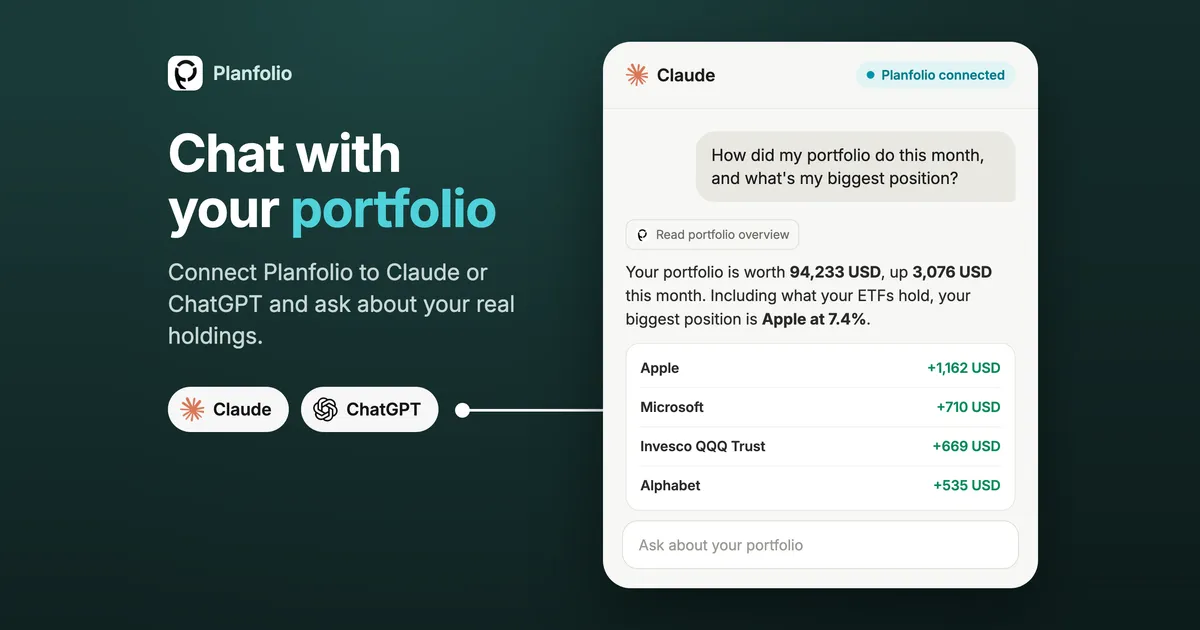
You can paste screenshots or upload a broker CSV into ChatGPT or Claude, but then the AI sees an outdated snapshot, has to rebuild your positions and returns from raw rows, and gets account data it doesn’t need. Planfolio connects your assistant directly to your portfolio instead: it reads your current, already calculated holdings and answers with your real numbers.
How the Planfolio connector works
Claude and ChatGPT can connect to apps through the Model Context Protocol (MCP), an open standard for giving an assistant read access to another service. You connect Planfolio once. From then on, your assistant looks up your portfolio whenever a question needs it, and you just ask.
What you get
- Your real numbers, already calculated. Portfolio value, returns and weights come straight from Planfolio, the same numbers you see in the app. The assistant explains them instead of calculating them.
- Always current. Nothing to export or upload. Ask today, ask again next month, and the answer reflects your portfolio as it is then.
- The whole picture. All your brokerage accounts in one place, and the Holdings X-ray looks through your ETFs. “What is my biggest position?” gets your real exposure, not just your largest line.
- More than holdings. Quality scores and fundamentals, your 12-month dividend outlook, upcoming earnings and payouts, unusual moves and your health check findings.
- Private and read-only. The assistant reads a summary you choose. It never sees your broker logins and can’t trade or change anything.
Prompts to try
Overview
- “How did my portfolio do this month, and what’s my biggest position?”
- “What is my biggest position, including what my ETFs hold?”
Concentration and risk
- “Am I too concentrated in one company, sector or country once you look through my ETFs?”
- “Which holdings moved unusually this month, and why?”
Quality
- “Which of my holdings have the weakest fundamentals?”
- “Compare the fundamentals of my two largest stocks.”
Dividends
- “Which dividends are coming up in the next three months?”
- “How much dividend income can I expect in the next 12 months, and from whom?”
Strategy
- “Where does my portfolio fall short in the health check, and which positions cause it?”
- “Explain my lowest health check score in plain words.”
Ask follow-ups the way you would ask a person: “Why?”, “Show me as a table”, “What would change if I left out crypto?”
Set up in two minutes
- In Planfolio, open Settings, then Integrations, and tap Add integration.
- Pick Claude, Claude Code or ChatGPT and add https://mcp.planfolio.io as a connector in your assistant.
- Enter the pairing code in the app and choose what to share.
The app shows the exact steps for each assistant, with the address ready to copy. Your portfolio isn’t in Planfolio yet? Import it from your brokers first, for example with the Trade Republic export.
What the assistant can read
| Shared | What it covers |
|---|---|
| Holdings and allocation | Open positions, weights, quantities, asset types and countries |
| Holdings X-ray | Your true exposure per security, including what your ETFs and funds hold |
| Quality scores and fundamentals | The scores and fundamentals of your holdings, and fundamentals of other companies you ask about |
| Swing | Which holdings moved more than usual this month |
| Dividends and events | Your 12-month dividend outlook, upcoming payouts, earnings dates and splits |
| Health check | Your score per dimension and which checks pass or fail |
| Recent transactions | Only if you turn it on |
You stay in control of your data
Your portfolio in Planfolio is end-to-end encrypted, and the connector doesn’t change that. The app builds a summary on your device and publishes only that summary for your assistant to read.
- Your choice of portfolios. Share all of them or pick the ones you want.
- Transactions are optional. Recent transactions are only included if you allow it.
- Never shared: broker accounts, broker names, account IDs and logins.
- See exactly what is shared. Show the exact data in the app displays the summary your assistant reads.
- Disconnect at any time. When you remove your last connection, the summary is deleted from the server.
FAQ
Which assistants work with Planfolio?
Claude, Claude Code and ChatGPT.
Can ChatGPT or Claude make trades for me?
No. The connector only reads. Buying and selling stays with you and your broker.
Do I need Planfolio Pro?
The AI connector is part of Planfolio Pro and also works during the free trial. You need the latest version of the app on iOS or Android.
Your assistant explains and analyses your portfolio. It is an information tool, not investment advice.
Try it
Update Planfolio, open Settings > Integrations and connect the assistant you already use.